Here’s a brief guide on customizing the style of your blog archive pages using the OceanWP theme in WordPress:
-
Access Your WordPress Dashboard
Log in to your WordPress site using your username and password. -
Navigate to the Customizer
From the dashboard, go to Appearance > Customize.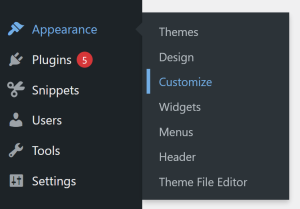
-
Find the Blog Archives Section
Inside the Customizer, go to Blog > Blog Archives. This section controls the style and layout of your archive pages, such as category pages, tag pages, and the main blog page.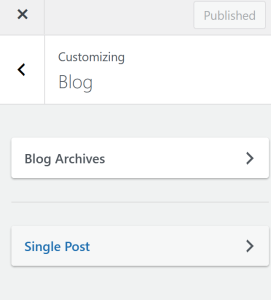
-
Choose an Archive Style
Under the Blog Style sub-heading, you can see the Blog Style and Blog Style Settings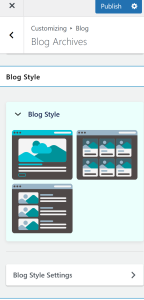
-
Preview Your Changes
Use the live preview to see how your blog archive pages look across desktop, tablet, and mobile devices. -
Save and Publish
Once you’re happy with your archive style settings, click Save & Publish to apply the changes to your live site.
By following these steps, you can easily style your blog archive pages in OceanWP, creating a professional and visually consistent layout for all your blog content.