Customizing your website is one of the most important steps in creating a site that reflects your brand, engages visitors, and delivers a polished experience. With FidHost’s website setup and the built-in WordPress Customizer, you have the tools to modify your site’s design in real time. You can adjust layout settings, and personalize your style without needing to write code.
-
Access Your WordPress Dashboard
Log in using your WordPress username and password, as mentioned in “How to Log In to Your WordPress Dashboard”. -
Navigate to the Customizer
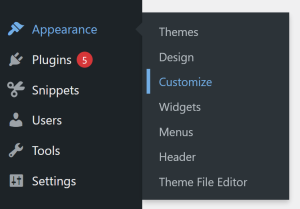
From the dashboard, go to Appearance > Customize. This opens the customization tool where all visual settings are controlled.
-
Explore Customization Options
Inside the Customizer, you’ll find settings that allow you to edit, such as:-
Colors
-
Typography
-
Header and footer
-
Menus
-
Blog layout
-
Site-wide style and structure
-
-
Use Live Previewing
As you make changes, the preview updates instantly, allowing you to experiment without affecting your live site until you’re ready. -
Publish Your Customizations
Once you’re satisfied with your design, click Publish to make the changes visible to visitors.
By learning how to customize your website, you unlock full control over your site’s identity and user experience, building a website that looks professional and works seamlessly for your goals.