Here’s a brief guide on how to edit your website’s homepage using the OceanWP theme in WordPress:
-
Access Your WordPress Dashboard
Log in to your WordPress site using your username and password, as mentioned in “How to Log In to Your WordPress Dashboard”. -
Navigate to the Customizer
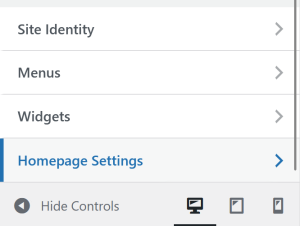
Go to Appearance > Customize, then look for Homepage Settings.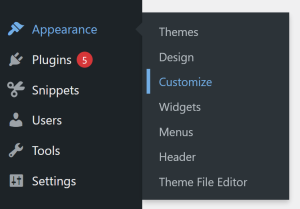
-
Check Your Homepage Settings
-
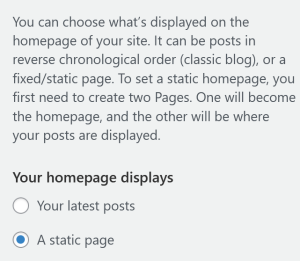
If you’re using a static homepage, make sure it’s properly assigned. Go to Appearance > Customize > Homepage Settings, then select A static page and choosing your desired page.
-
If your homepage is set to display your latest posts, you can edit its layout under Customizer > Blog > Entries instead.
-
-
Customize Homepage Content
Click Edit with Elementor to make visual edits directly.
-
Preview Your Changes
Always preview your homepage before publishing to make sure you’re satisfied with the layout across different devices. -
Save and Publish
Once satisfied with the edits, click Update in the page editor or Save & Publish in the Customizer to make the changes live.
By following these steps, you can easily update your homepage to make sure your users get a strong first impression of your website.